# Spring Boot + Redis + PostgreSQL Caching
Photo by Markus Spiske on Unsplash
Hi everyone,
In this post, I would like to show you how to use Redis for Caching with Spring Boot application.
Caching is a very important approach for web development. It helps you to give quick response for your request.
Table of Contents:
- [**Getting Started**](#getting-started)
- [**Project Structure**](#project-structure)
- [**Maven Dependencies**](#maven-dependencies)
- [**Redis Configuration**](#redis-configuration)
- [**Spring Cache Annotations**](#spring-cache-annotations)
- [**Service Layer**](#service-layer)
- [**Docker & Docker Compose**](#docker-and-docker-compose)
- [**Build & Run**](#build-and-run)
- [**Demo**](#demo)
- [**Conclusion**](#conclusion)
## Getting Started
Redis is most popular tool to use for caching. It is widely usage in the web application development.
What is Redis?
> Redis is an open source (BSD licensed), in-memory data structure store, used as a database, cache, and message broker. Redis provides data structures such as strings, hashes, lists, sets, sorted sets with range queries, bitmaps, hyperloglogs, geospatial indexes, and streams.
In this post, I have created a simple demo. It includes a `Customer` class.
There are `getAllCustomers(), getCustomerById()` methods in `Controller` layer. These are cacheable. If you send requests for these methods, you can be wait for 3 seconds if Redis has no related data in memory.
Scenario is like this.
Let's begin.
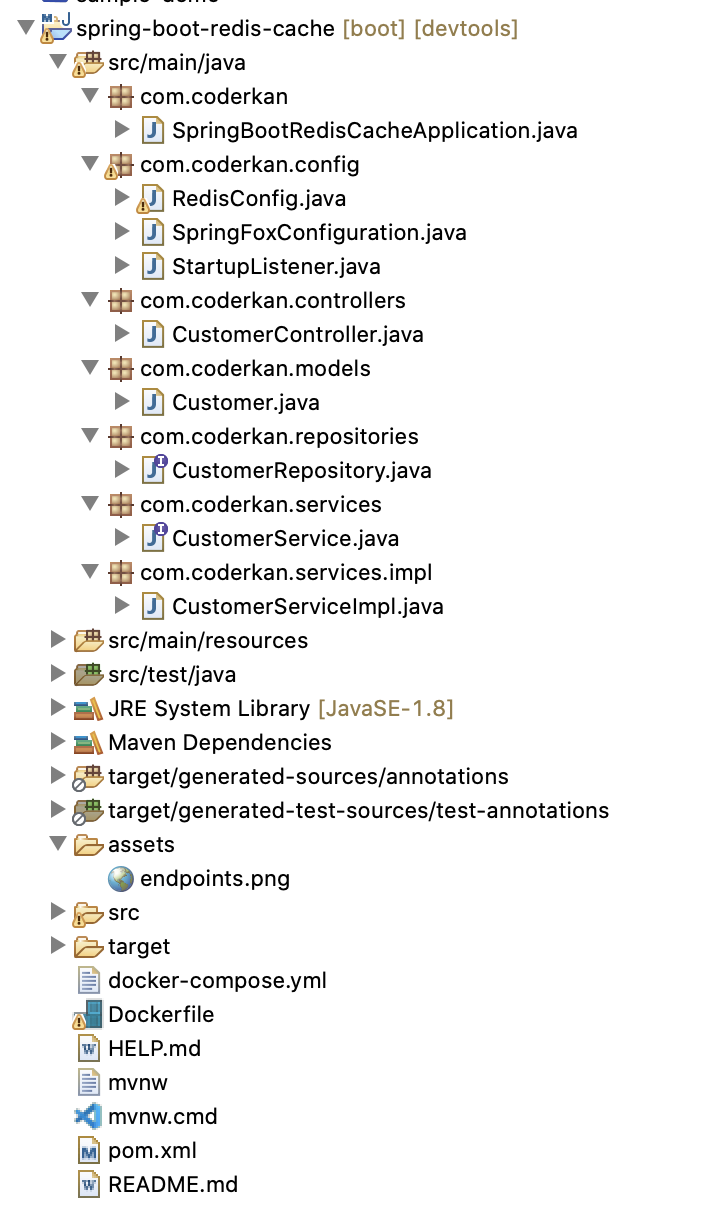
## Project Structure
## Maven Dependencies
First of all, we need to add relevant dependencies to `pom.xml` file.
I will use jedis client.
`pom.xml`:
```xml
org.springframework.boot
spring-boot-starter-data-redis
redis.clients
jedis
```
## Redis Configuration
I have created a configuration file for `Redis` configuration like below.
I created `redisCacheTemplate` and `cacheManager` beans for Redis.
```java
@Configuration
@AutoConfigureAfter(RedisAutoConfiguration.class)
@EnableCaching
public class RedisConfig {
@Autowired
private CacheManager cacheManager;
@Value("${spring.redis.host}")
private String redisHost;
@Value("${spring.redis.port}")
private int redisPort;
@Bean
public RedisTemplate redisCacheTemplate(LettuceConnectionFactory redisConnectionFactory) {
RedisTemplate template = new RedisTemplate<>();
template.setKeySerializer(new StringRedisSerializer());
template.setValueSerializer(new GenericJackson2JsonRedisSerializer());
template.setConnectionFactory(redisConnectionFactory);
return template;
}
@Bean
public CacheManager cacheManager(RedisConnectionFactory factory) {
RedisCacheConfiguration config = RedisCacheConfiguration.defaultCacheConfig();
RedisCacheConfiguration redisCacheConfiguration = config
.serializeKeysWith(
RedisSerializationContext.SerializationPair.fromSerializer(new StringRedisSerializer()))
.serializeValuesWith(RedisSerializationContext.SerializationPair
.fromSerializer(new GenericJackson2JsonRedisSerializer()));
RedisCacheManager redisCacheManager = RedisCacheManager.builder(factory).cacheDefaults(redisCacheConfiguration)
.build();
return redisCacheManager;
}
}
```
## Spring Cache Annotations
I have used Spring Cache Annotations.
I would like to explain you what they are.
* `@Cacheable` triggers cache population
* `@CacheEvict` triggers cache eviction
* `@CachePut` updates the cache without interfering with the method execution
* `@Caching` regroups multiple cache operations to be applied on a method
* `@CacheConfig` shares some common cache-related settings at class-level
## Service Layer
I have created a service layer for customer. I have used Spring Annotations for Caching.
When you get all customers you will get all data from database if Redis has no related data.
`waitSomeSome()` method is written for simulation. When add new `Customer` or update a `Customer`, Redis database related data will evict.
```java
@Service
@CacheConfig(cacheNames = "customerCache")
public class CustomerServiceImpl implements CustomerService {
@Autowired
private CustomerRepository customerRepository;
@Cacheable(cacheNames = "customers")
@Override
public List getAll() {
waitSomeTime();
return this.customerRepository.findAll();
}
@CacheEvict(cacheNames = "customers", allEntries = true)
@Override
public Customer add(Customer customer) {
return this.customerRepository.save(customer);
}
@CacheEvict(cacheNames = "customers", allEntries = true)
@Override
public Customer update(Customer customer) {
Optional optCustomer = this.customerRepository.findById(customer.getId());
if (!optCustomer.isPresent())
return null;
Customer repCustomer = optCustomer.get();
repCustomer.setName(customer.getName());
repCustomer.setContactName(customer.getContactName());
repCustomer.setAddress(customer.getAddress());
repCustomer.setCity(customer.getCity());
repCustomer.setPostalCode(customer.getPostalCode());
repCustomer.setCountry(customer.getCountry());
return this.customerRepository.save(repCustomer);
}
@Caching(evict = { @CacheEvict(cacheNames = "customer", key = "#id"),
@CacheEvict(cacheNames = "customers", allEntries = true) })
@Override
public void delete(long id) {
this.customerRepository.deleteById(id);
}
@Cacheable(cacheNames = "customer", key = "#id", unless = "#result == null")
@Override
public Customer getCustomerById(long id) {
waitSomeTime();
return this.customerRepository.findById(id).orElse(null);
}
private void waitSomeTime() {
System.out.println("Long Wait Begin");
try {
Thread.sleep(3000);
} catch (InterruptedException e) {
e.printStackTrace();
}
System.out.println("Long Wait End");
}
```
## Docker & Docker Compose
I have created a `Dockerfile` and `docker-compose.yml` files for dockerize this application.
I will use `postgresql` for RDBMS db. I added redis with `cache` tag to docker-compose.yml file. Docker compose is a very useful tool to run more than one containers.
`Dockerfile`:
```
openjdk:8
ADD ./target/spring-boot-redis-cache-0.0.1-SNAPSHOT.jar /usr/src/spring-boot-redis-cache-0.0.1-SNAPSHOT.jar
WORKDIR usr/src
ENTRYPOINT ["java","-jar", "spring-boot-redis-cache-0.0.1-SNAPSHOT.jar"]
```
`docker-compose.yml`:
```yaml
version: '3'
services:
db:
image: "postgres"
ports:
- "5432:5432"
environment:
POSTGRES_DB: postgres
POSTGRES_USER: postgres
POSTGRES_PASSWORD: ekoloji
cache:
image: "redis"
ports:
- "6379:6379"
environment:
- ALLOW_EMPTY_PASSWORD=yes
- REDIS_DISABLE_COMMANDS=FLUSHDB,FLUSHALL
app:
build: .
ports:
- "8080:8080"
environment:
SPRING_DATASOURCE_URL: jdbc:postgresql://db/postgres
SPRING_DATASOURCE_USERNAME: postgres
SPRING_DATASOURCE_PASSWORD: ekoloji
SPRING_REDIS_HOST: cache
SPRING_REDIS_PORT: 6379
depends_on:
- db
- cache
```
## Build And Run
Building and running this application, you need to run some cli commands like mvn and docker.
Firstly, I made a fat jar for my application. After that I build my docker-compose file.
Finally, you just need to `up`docker-compose file.
When you follow this road map, you application will be started successfully. You can just go to `http://localhost:8080` or `http://localhost:8080/swagger-ui.html`. If you go to `http://localhost:8080/swagger-ui.html` link, you can see easily the endpoints of project and you can also test them with Swagger tool.
Build Java Jar.
```sh
$ mvn clean install -DskipTests
```
Docker Compose Build and Run
```sh
$ docker-compose build --no-cache
$ docker-compose up --force-recreate
```
## Demo
I made a video on how to run and test this application on Youtube.
%[https://youtu.be/4yr4JLRK6MM]
## Conclusion
In this tutorial, we configured the Spring Boot applicaion to communicate with `Redis` and `PostgreSql` via `Docker`. Redis is more powerful tool for caching.
I hope you enjoy while reading.
Have a nice coding.
Source code available in [github](https://github.com/coderkan/spring-boot-redis-cache).